
Figma Unveils Cutting-Edge AI-Powered Image Editing Features
Today, Figma announced exciting new AI-driven capabilities, including advanced object removal, isolation, and image expansion.
Streamlined Editing: No More Exporting Hassles
Figma’s latest features aim to simplify the editing process by eliminating the need to export images to third-party tools. While AI generation models like Nano Banana excel at creating images, users often require precise editing tools that don’t rely on text prompts.
Enhanced Lasso Tool: Effortless Object Manipulation
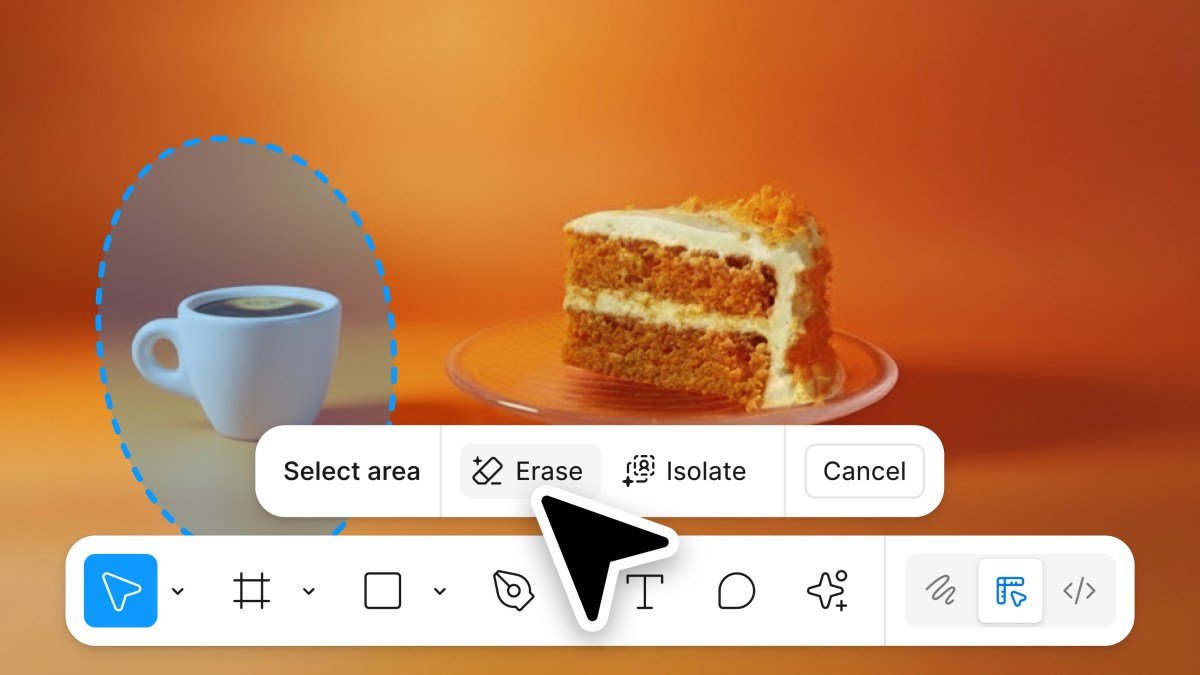
The revamped lasso tool now allows users to effortlessly select, remove, or isolate objects. Even when moved, the object retains essential image characteristics, such as background and color. Users can fine-tune aspects like lighting, shadow, color, and focus directly within Figma.
Image Expansion: Flexibility for Creative Formats
Figma introduces a valuable image expansion feature, particularly useful for adapting designs to different formats. This tool allows users to easily fill in backgrounds or other details, saving time on cropping and element adjustments when creating assets like web or mobile banners.

Centralized Toolbar: All Your Editing Tools in One Place
In addition to these features, Figma is consolidating its image editing tools into a single toolbar for easy access. Users can now select objects, change background colors, and add annotations seamlessly. Recognizing that background removal is one of the platform’s most popular actions, Figma has ensured it features prominently in the new toolbar.
Figma Joins the Ranks of Competitors with Object Removal
While industry giants like Adobe and Canva have offered object removal features for some time, Figma is now stepping up to meet user demands.
Availability and Future Plans
These innovative image editing features are currently accessible on Figma Design and Draw, with plans for broader availability across Figma tools next year.
Coinciding Launch with Adobe’s New ChatGPT Features
In a related development, Adobe also rolled out similar features for ChatGPT users today. Figma was a launch partner for the app in October, although it’s still unclear if the new functions will be integrated for Figma users within OpenAI’s tool.
Here are five FAQs with answers regarding Figma’s new AI-powered object removal and image extension features:
FAQ 1: What is the AI-powered object removal feature in Figma?
Answer: The AI-powered object removal feature in Figma allows users to easily eliminate unwanted elements from images. Utilizing advanced algorithms, it intelligently fills in the background after an object is removed, ensuring a seamless look.
FAQ 2: How can I use the image extension feature in Figma?
Answer: The image extension feature enables users to expand images beyond their original dimensions. You can simply select an image and use the extension tool to add more visual content while maintaining the overall style and coherence of the design.
FAQ 3: Is the AI object removal feature available in all Figma plans?
Answer: Yes, the AI object removal feature is available to all Figma users, regardless of their subscription plan. However, some enhanced functionalities may be limited to specific tiers or require additional plugins.
FAQ 4: How does the AI technology work for object removal?
Answer: The AI technology leverages machine learning models trained on vast datasets to identify and comprehend the context of images. When an object is removed, the algorithm predicts and generates the background image content, ensuring that the edit looks natural.
FAQ 5: Can I use the object removal and image extension features on mobile devices?
Answer: Currently, the object removal and image extension features are optimized for the Figma web and desktop applications. Mobile access may provide limited functionality, with full features available on larger screens.
No comment yet, add your voice below!